
 EN
EN  ZH
ZH Chime Visa® Debit Card
Get a Chime Visa® Debit Card online.
- No monthly fees or maintenance fees
- Over 50,000 fee-free ATMs¹
- Real-time transaction alerts

A debit card you can count on.
Unlock your financial future with a Chime Visa® Debit Card. Avoid replacement fees and maintenance fees, control your debit card security from your app, get cash back with Chime Deals², and get cash from over 50,000 fee-free ATMs.¹
01
Sign up for your debit card for free.
- Your new Chime Debit Card works anywhere Visa
- Start using your virtual debit card right away for online purchases
- No minimum balance requirements or account maintenance fees
02
Customizable debit card security.
- Get real-time transaction alerts
- Disable transactions from the app if you lose your debit card
- Still missing? Use the app to order a replacement debit card
03
Pay with your phone.
-
Leave your wallet at home. Connect your virtual debit card to your mobile device. Enjoy quick, secure mobile payments with platforms like Google Pay™ and Apple Pay™.
04
Grow your savings automatically.
-
Turn on Round Ups to transfer the change from every purchase on your debit card to your savings account.² Use Save When I Get Paid to save a percentage of every paycheck automatically.⁴
05
Overdraft up to $200 with no fees⁵
-
We understand finances can be tight sometimes. SpotMe® allows Chime members to borrow a bit of money when they need it.
Over 1 million
5-star reviews.


Visa® Debit Card vs. our
competitors.
Chime
Wells Fargo4,5,6
Chase7,8
Overdraft fee
$0
Up to $35
Up to $34
Monthly account fee
$0
Up to $35
Up to $35
International Transfer
$0
Up to 3%
Up to 3%
Fee-free ATMs
50,000+
12,000
16,000
How to get a Chime Visa® Debit Card in a few steps.
01
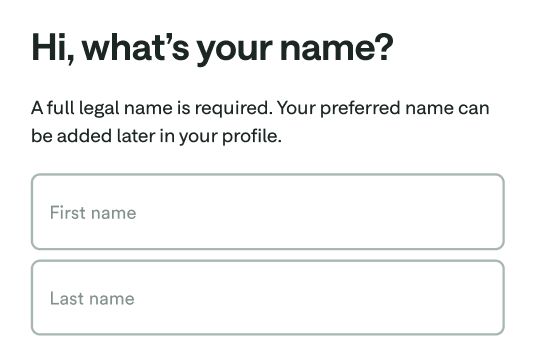
- Sign up in 2 minutes. Apply for Chime by telling us your name, address, date of birth, and social security number.
02
- Download the Chime app. Get started on chime.com or log into the mobile app. Set up direct deposit or connect your current bank account to transfer money to your debit card.


03
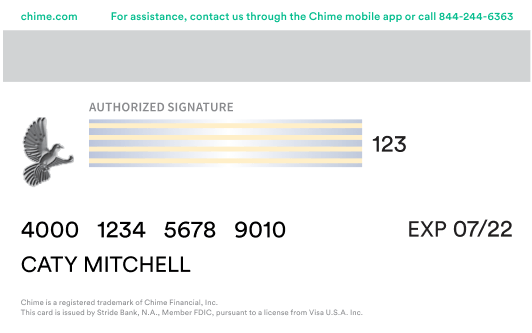
- Use your virtual debit card today. Make digital purchases with your virtual debit card. Head to Settings in the Chime app, scroll down to Debit Card, and tap View your card.
04
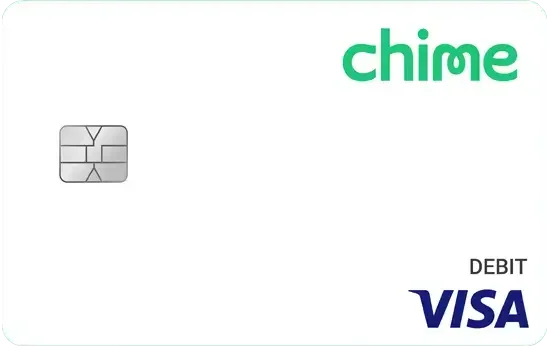
- Your physical debit card ships in 7-10 business days. Keep an eye on the mail for your new Chime Visa® Debit Card!
Your Chime Visa®
Debit Card awaits.
Apply online for free in less than 2 minutes with no impact on your credit score.
Still have questions
about debit cards?
How do I open an online Chime® Checking Account and get a Visa® Debit Card?
- Visit chime.com to apply and enter your personal info to complete the enrollment. You’ll need:
- Your first and last name
- Phone number
- Date of birth
- Email address and an account password
- Social Security number
- Home address
- 18+ U.S. Citizen or resident of 50 United States
- Once enrollment is completed, we’ll send a Chime Visa® Debit Card in the mail to the address you provided. Your free debit card typically arrives in 7-10 business days.
Do I need a credit check to get a Chime Visa® Debit Card?
- Visit chime.com to apply and enter your personal info to complete the enrollment. You’ll need:
- Your first and last name
- Phone number
- Date of birth
- Email address and an account password
- Social Security number
- Home address
- 18+ U.S. Citizen or resident of 50 United States
- Once enrollment is completed, we’ll send a Chime Visa® Debit Card in the mail to the address you provided. Your free debit card typically arrives in 7-10 business days.
How do I activate my Chime Debit Card?
- Visit chime.com to apply and enter your personal info to complete the enrollment. You’ll need:
- Your first and last name
- Phone number
- Date of birth
- Email address and an account password
- Social Security number
- Home address
- 18+ U.S. Citizen or resident of 50 United States
- Once enrollment is completed, we’ll send a Chime Visa® Debit Card in the mail to the address you provided. Your free debit card typically arrives in 7-10 business days.
Where can I use my Chime Debit Card?
- Visit chime.com to apply and enter your personal info to complete the enrollment. You’ll need:
- Your first and last name
- Phone number
- Date of birth
- Email address and an account password
- Social Security number
- Home address
- 18+ U.S. Citizen or resident of 50 United States
- Once enrollment is completed, we’ll send a Chime Visa® Debit Card in the mail to the address you provided. Your free debit card typically arrives in 7-10 business days.
Does my Chime Debit Card have a chip?
- Visit chime.com to apply and enter your personal info to complete the enrollment. You’ll need:
- Your first and last name
- Phone number
- Date of birth
- Email address and an account password
- Social Security number
- Home address
- 18+ U.S. Citizen or resident of 50 United States
- Once enrollment is completed, we’ll send a Chime Visa® Debit Card in the mail to the address you provided. Your free debit card typically arrives in 7-10 business days.
How do I add money to my Chime Debit Card?
- Visit chime.com to apply and enter your personal info to complete the enrollment. You’ll need:
- Your first and last name
- Phone number
- Date of birth
- Email address and an account password
- Social Security number
- Home address
- 18+ U.S. Citizen or resident of 50 United States
- Once enrollment is completed, we’ll send a Chime Visa® Debit Card in the mail to the address you provided. Your free debit card typically arrives in 7-10 business days.